- Home
- Testimonials
- Purchase
- Developer Tools
- Desktop Utilities
- Download
- Support
- Blog
- Company
Remove rows with data from existing Excel (.XLS) document using Bytescout Spreadsheet SDK - Sample source code
How to remove rows from existing XLS (Excel) document using Bytescout Spreadsheet SDK
This source code describes how to remove rows from existing Excel (XLS) document and save changed document as new document file using Bytescout Spreadsheet lib
Download example source code: bytescoutxls_removing_rows_from_existing_xls.zip (8 KB)
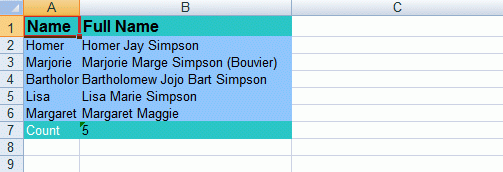
Source Excel document:

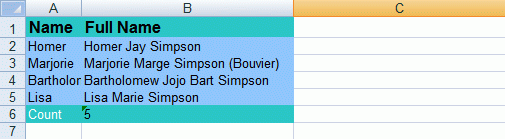
Modified Excel document (row with Maggie name and full name was removed):

using System;
using System.Collections.Generic;
using System.Text;
using Bytescout.Spreadsheet;
namespace Removing_rows_from_existing_XLS
{
class Program
{
static void Main(string[] args)
{
// Open Spreadsheet
Spreadsheet document = new Spreadsheet("AdvancedReport.xls");
// Get Worksheet
Worksheet worksheet = document.Workbook.Worksheets[0];
// Remove row
worksheet.Rows.Delete(5, 5);
// Save document
document.SaveAs("AdvancedReport1.xls");
// Close Spreadsheet
document.Close();
}
}
}
Download example source code: bytescoutxls_removing_rows_from_existing_xls.zip (8 KB)
Filed in:
Spreadsheet SDK
Tutorials: